


Pocket FM: Audio Series
4.490.44K Reviews
App Specs
- Version
- Varies with Device
- Updated On
- License
- Free
- Downloads
- 100,000,000+
- Developer
- PocketFM
- Categories
- Music & Audio
- Platform
- Android, iOS
Screenshots



 Analysis by AppCompare
I’ve found that Pocket FM is easiest to judge when I treat it as a way to follow a continuing story, rather than as a general-purpose music player. It suits the small gaps in a day: a walk, a quiet chore, or a commute when looking at a screen is inconvenient. The main question is whether you enjoy serialized audio enough to keep returning to the same story. If you usually want songs, podcasts, or a complete audiobook you can finish in a few sittings, its story-first approach may feel less natural.
Where the listening routine can snag
The first difficulty is often choosing what to play. A large collection sounds convenient, but browsing many series can turn a short break into a long search. I’d start with a genre or mood I already know I enjoy, then sample a story before deciding to follow it. Pocket FM’s fantasy and romance mix may appeal if you like dramatic, ongoing plots; it is less likely to satisfy someone looking for factual discussion or a carefully edited, standalone program.
Another point to keep in mind is that serialized listening asks for continuity. If you pause a story for several days, it can take a moment to remember who is involved and what the last twist meant. I find it helpful to keep to one main series during busy weeks instead of starting several at once. That small habit makes it easier to return without turning entertainment into homework.
Guides and Analysis on Pocket FM: Audio Series
Listening also competes with the sounds around you. On a noisy bus or while using equipment at home, dialogue can be harder to follow than music. I would choose a quieter moment for an episode with lots of character names or plot detail, and save familiar stories for places where attention comes and goes. That is a practical distinction: audio drama can make routine tasks feel more engaging, but it does not always work as background sound.
Simple checks before settling in
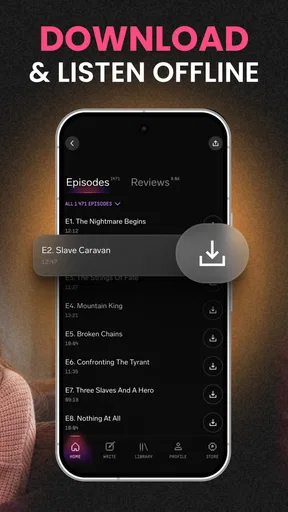
Before leaving home for a stretch without reliable connectivity, I would check whether the episode I want is available for offline listening and allow it to finish downloading while connected. That avoids discovering at the bus stop that a planned listening session depends on a connection. Downloads are most useful when chosen deliberately: save the next episode or two you expect to hear, rather than filling a device with stories you may never continue.
For bedtime, I’d set the sleep timer to suit the way I actually listen. If it is too short, playback may stop while I am still awake; if it is too long, the story can continue after I have fallen asleep, making it harder to pick up the plot later. A brief pause to check the timer and the current episode is more useful than assuming the app will stop at exactly the right moment.
Playback speed is another setting worth testing, not simply turning up. A modest adjustment can help when a narrator’s pace feels slow, but fast dialogue or a tense scene may lose its rhythm if accelerated too much. I usually judge a setting over a short stretch, then change it back if voices become tiring to follow. The best speed is the one that keeps the story clear, not the one that gets through the most minutes.
Worth Reading Before You Choose

Basketball Stars: Multiplayer Is Fast, but Can It Recover When Matches Go Wrong?

WEBTOON Turns Phone Updates Into a Better Reading Routine

Link to Windows Runs on Shared Habits, Not Social Feeds

How Alibaba.com Dominates the B2B Marketplace

Metro's Quiet Rise: Redefining Mobile Communication

Harnessing Ecosystem Power with Phone Tracker by Number
Recovering a listening session
If an episode does not play as expected, I would first check the basics: whether the device has a working connection, whether the app is still open and responsive, and whether the chosen episode has finished downloading if I am listening offline. Then I would try resuming the episode or selecting it again. These simple checks help separate a momentary playback hiccup from a problem with the listening setup without assuming that every interruption has the same cause.
When I lose my place, I prefer to move back a little and listen through the last familiar exchange rather than jump far ahead. In a plot-heavy series, a few lines can clarify whether I am on the right episode or have missed a scene. If I have been listening while distracted, replaying a short section is often less frustrating than carrying on with a gap in the story.
For a routine with several series, I would make the next choice before closing the app: note which story I want for the next commute and leave the other one for a quieter moment. Playlists can help collect episodes or series I intend to revisit, but they are most useful as a simple queue, not as a substitute for remembering every plot. Keeping the list focused makes it quicker to start listening when I only have a few minutes.
When the app may not be the cause
Audio interruptions can come from the listening environment as much as from the app. A weak or changing connection can affect streaming, while traffic noise, a pocket pressing controls, or an interruption from another activity can make it seem as if playback itself is unreliable. I would test a short session in a calm place before changing several settings at once. If offline playback works but streaming does not, that points to a different issue than if neither works.
It is also worth considering whether the format is right for the moment. A cliffhanger-heavy drama demands more attention than a familiar playlist, and missing several minutes may leave the next scene confusing. If you need something that can be ignored and picked up without context, music or a conversational podcast may be a better fit. Pocket FM is most rewarding when you can give a story at least some focused attention.
Who will get the most from it
I’d recommend Pocket FM to listeners who enjoy ongoing fiction and want entertainment that does not require staring at a screen. It can fit a walk, meal preparation, tidying, or a commute, especially when a story has become familiar enough to follow while doing a simple task. It may also suit someone who likes discussing plot turns with other fans; just keep community browsing separate from the episode if you are trying to make a short listening break stay short.
I would steer people who mainly want albums, radio, or a broad mix of independent podcasts toward an app built around those habits. The usual music services make it easier to switch between tracks and moods, while podcast apps are generally a more natural home for subscriptions to spoken programs. Pocket FM’s appeal is the continuing audio-series experience. Comparing it with those alternatives is less about which has more content and more about whether you want a story to follow or a soundtrack to select.
A realistic use case is a listener who takes the same bus each morning. They can choose an episode before leaving, download it in advance if they expect a connection gap, and use playback speed that keeps dialogue comfortable above the road noise. At home, that same listener might switch to a calmer setting and use the sleep timer for a bedtime episode. The value comes from matching the listening setup to the situation, not from using every option at once.
Immersive Audio Experience
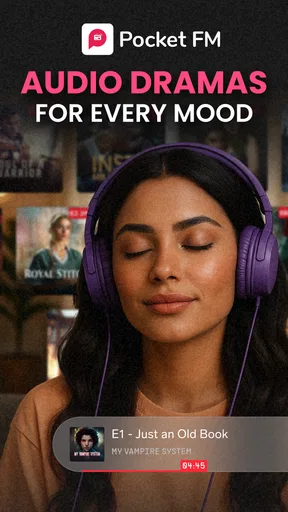
Once you open Pocket FM, you’re greeted with a vast library of audio series, covering genres that range from romance and thriller to horror and motivational tales. The variety is impressive, ensuring there’s something for everyone. I was particularly hooked by their original audio dramas which are crafted with such attention to detail that they easily transport you to another world.
User-Friendly Interface
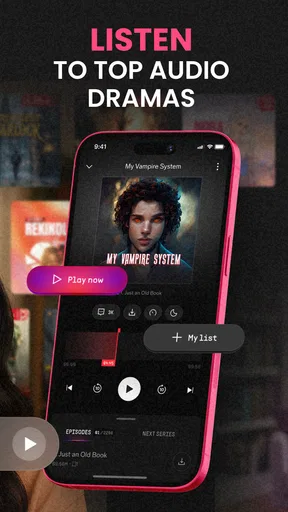
One thing I appreciate about Pocket FM is its clean and intuitive interface. Everything is laid out in a way that makes navigation a breeze. Whether you’re searching for a new series or revisiting an old favorite, the app is designed to get you there with minimal fuss. Plus, the player itself is easy to use, allowing you to adjust playback speed, set sleep timers, and even download episodes for offline listening.
Customizable Experience
Not everyone’s listening habits are the same, and Pocket FM gets that. You can create playlists of your favorite episodes or series, making it easy to come back to them later. I found this feature super handy for keeping track of the multiple series I’m following. And if you’re someone who likes to listen before bed, the sleep timer is a godsend, so you don’t wake up in the middle of the night to the sound of a suspenseful climax!
Community and Interaction
It’s not just about passive listening. Pocket FM has a vibrant community where you can connect with other listeners, share your thoughts on recent episodes, and even discuss plot theories. I’ve found myself getting lost in the comments section more than once, debating character motivations and plot twists with other fans.
For those who enjoy a little more interaction, the app also offers a feature where you can suggest storylines or vote on upcoming content. It’s a cool way to feel involved in the creative process and see your ideas potentially come to life.
Practical value and trade-offs
Pocket FM is a free app from PocketFM, with a Teen content rating. It has a 4.5 average from around 4.3 million ratings and has been installed over 100 million times, so it clearly reaches a large audience. I’d still treat those numbers as a sign of broad interest rather than proof that every series will suit my taste. The useful test is whether I find a story I want to continue after sampling it.
There are in-app purchases, with items priced from around sixteen cents to about three hundred sixty-five dollars. That range makes it sensible to pay attention to any purchase prompt and understand what an item offers before choosing it. I would start with the free experience and decide whether I am comfortable spending only after I know how I use the app. If you prefer an audio service with a simple, predictable cost and no in-app purchase decisions, that preference may point you elsewhere.
Because the catalog is built around series, I would also be selective about what I follow. Starting a dozen stories because their premises sound interesting can leave you with too many unfinished plots. A better approach is to keep one or two active, use a playlist for anything you might try later, and drop a series if its pacing or narration is not working for you. You do not need to finish a story just because you have already spent time with it.
The app was released on February 25, 2021. For me, that matters less than whether it fits a current routine: a library of audio fiction is only useful if I can find a story I enjoy and return to it comfortably. The strongest reason to choose it is the combination of serialized storytelling and practical listening options. The clearest reason to skip it is also straightforward: if fiction is not what you want to hear, the central experience will not become more appealing just because the player has convenient controls.
Final Thoughts
All in all, Pocket FM has become a staple in my daily routine. Whether I'm winding down after a long day or just need a little entertainment while doing chores, the app delivers an exceptional audio experience that keeps me coming back for more. If you’re looking for a way to make your day a bit more interesting or need a break from screens, give Pocket FM a try. Trust me, once you start, you’ll be hooked. Happy listening!
Pros
- Extensive library of audio content.
- User-friendly interface design.
- Offline listening available.
- High-quality audio streaming.
- Regularly updated with new series.
Cons
- Limited free content options.
- Ads can be intrusive for free users.
- Requires internet for initial download.
- Subscription needed for premium access.
- Some series lack English subtitles.
FAQs for Pocket FM: Audio Series
What is Pocket FM and what can I find on it?
Pocket FM is an audio streaming app that offers a wide range of audio content, including stories, podcasts, audiobooks, and radio shows. Users can explore genres like romance, thriller, and self-help, ensuring there's something for everyone. With its user-friendly interface, it's designed to be a one-stop destination for audio entertainment.
Is Pocket FM free to use, or are there any subscription costs?
Pocket FM offers both free and premium content. While you can access a variety of stories and shows for free, a subscription unlocks exclusive content, ad-free listening, and offline downloads. The app provides flexible subscription plans, making it easy to choose one that fits your budget and listening habits.
Can I download content for offline listening on Pocket FM?
Yes, Pocket FM allows users to download audio content for offline listening. This feature is particularly useful for those who commute or travel frequently, as it ensures uninterrupted access to your favorite stories and podcasts without the need for an internet connection.
Is Pocket FM available in multiple languages?
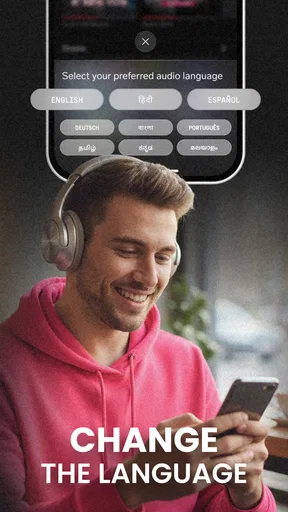
Pocket FM caters to a diverse audience by offering content in multiple languages, including English, Hindi, and regional Indian languages. This makes it an excellent choice for users who prefer consuming content in their native language or want to explore stories from different cultures.
How does Pocket FM personalize recommendations for users?
Pocket FM uses advanced algorithms to analyze your listening habits and preferences, providing personalized recommendations tailored to your taste. By tracking the genres and types of content you engage with, it curates a list of suggested stories and shows, enhancing your overall listening experience.


